
Add-on module

Finances

See the money coming in. Understand what stays.

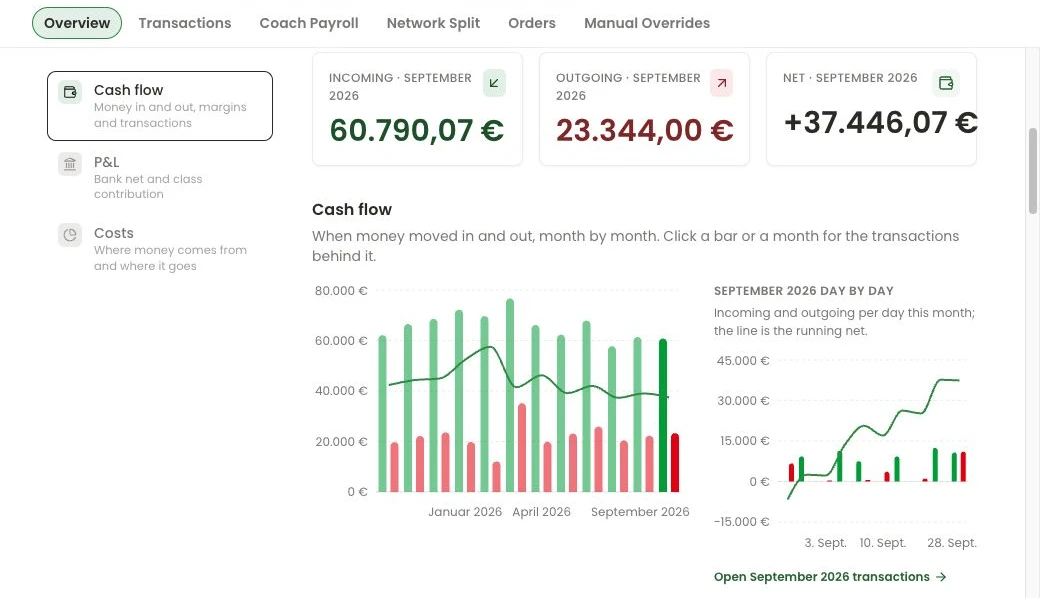
Categorise income and expenses, follow cash flow and explore class profitability. Transactions arrive in numara through the finAPI bank connection.

numara / FinanceDemo studio
Actual numara Finance screen with sample data.
Actual product · Sample data · Open full-size view ↗

numara’s finance module imports your business account transactions, sorts income and expenses into categories automatically and shows cashflow, profit and loss, class margins and a coach payroll preview.

Finances

What you can do with it

Import transactions

Connect your business account through finAPI; transactions then arrive automatically.

Sorted automatically

Rules and AI suggest categories. Review the assignments and set rules for recurring transactions.

Cashflow & P&L

Income, expenses and net cashflow per month, plus profit and loss — no spreadsheets.

Class margins

What a class format earns and costs, by weekday and time slot.

Coach payroll

A preview of fees per coach with export and a monthly approval step.

FAQ

Finances: questions & answers

Which banks are supported?

Connect your business accounts through finAPI, where you choose your bank and authorise access.

Does numara replace my accounting?

No. numara gives you the operator’s view of cashflow and margins. Bookkeeping and annual accounts stay with your tax advisor.

Connections that do the work

Your booking channels. Your bank. One clear view.

A class doesn’t end at the booking. numara connects the place in class with the check-in and the numbers behind your business.

Urban Sports ClubSoftware partner

One place, wherever it gets booked.

Publish classes from numara to Urban Sports Club. Direct and USC bookings share class capacity. Cancellations and check-ins feed back into the same workflow.

  • Sync classes and sessions
  • Connect bookings and cancellations
  • Handle check-ins at the studio

numara is an Urban Sports Club software partner. Your team manages classes, bookings and visits in one connected workflow.

Discuss your USC connection
finAPIBank connection

From bank transactions to business decisions.

The finAPI connection brings accounts and transactions into numara with your authorisation. Categorise income and expenses, then follow your studio’s cash flow.

  • Authorise bank access through finAPI
  • Import accounts and transactions
  • Categorise income and expenses

Connect your business account and keep income, expenses and cash flow together in one view.

Ask about your bank

Let’s walk through your working day.

Bring your questions. We’ll show you the workflows that matter to your studio and work out what getting started would involve.

Request a demo See offers